
Please Note: This article is written for users of the following Microsoft Word versions: 97, 2000, 2002, and 2003. If you are using a later version (Word 2007 or later), this tip may not work for you. For a version of this tip written specifically for later versions of Word, click here: Changing How Word Flags Compound Words.
Mark is having a problem with the spell checker and words that are connected with each other using a non-breaking hyphen. It seems that Word is flagging the words as incorrect, when it never flags them if the hyphen isn't there. Mark tried adding the words to the dictionary and tried telling Word to ignore the words, but they still get flagged.
There are two things to try. First, you can try these steps:
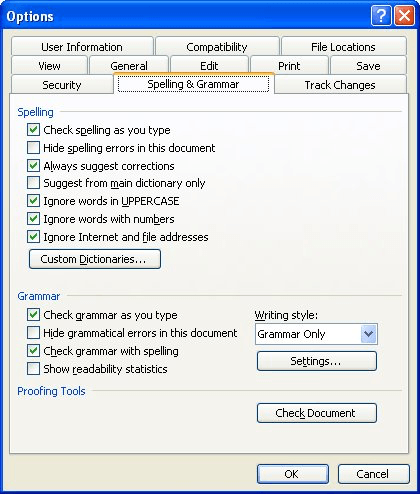
Figure 1. The Spelling & Grammar tab of the Options dialog box.
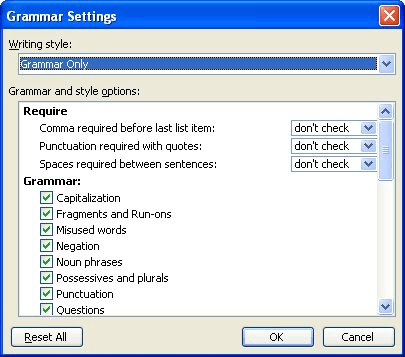
Figure 2. The Grammar Settings dialog box.
The other option is to try a workaround that some subscribers have reported as successful. Select the first word (the one before the hyphen) and add it to Word's exclusion list. (How you create and use exclusion lists has been examined in other issues of WordTips; doing a search for the phrase on the WordTips website will turn up several results.)
WordTips is your source for cost-effective Microsoft Word training. (Microsoft Word is the most popular word processing software in the world.) This tip (5394) applies to Microsoft Word 97, 2000, 2002, and 2003. You can find a version of this tip for the ribbon interface of Word (Word 2007 and later) here: Changing How Word Flags Compound Words.
Create Custom Apps with VBA! Discover how to extend the capabilities of Office 365 applications with VBA programming. Written in clear terms and understandable language, the book includes systematic tutorials and contains both intermediate and advanced content for experienced VB developers. Designed to be comprehensive, the book addresses not just one Office application, but the entire Office suite. Check out Mastering VBA for Microsoft Office 365 today!
Having problems making spell check work on a portion of your document? There are two primary causes for such an ...
Discover MoreOne of the final touches that many people perform is to check the spelling of their document. This can help improve the ...
Discover MoreProper nouns (such as the names of people) are routinely marked as incorrect by Word's spell checker. If you are tired of ...
Discover MoreFREE SERVICE: Get tips like this every week in WordTips, a free productivity newsletter. Enter your address and click "Subscribe."
There are currently no comments for this tip. (Be the first to leave your comment—just use the simple form above!)
Got a version of Word that uses the menu interface (Word 97, Word 2000, Word 2002, or Word 2003)? This site is for you! If you use a later version of Word, visit our WordTips site focusing on the ribbon interface.
Visit the WordTips channel on YouTube

FREE SERVICE: Get tips like this every week in WordTips, a free productivity newsletter. Enter your address and click "Subscribe."
Copyright © 2026 Sharon Parq Associates, Inc.
 Please Note:
This article is written for users of the following Microsoft Word versions: 97, 2000, 2002, and 2003. If you are using a later version (Word 2007 or later), this tip may not work for you. For a version of this tip written specifically for later versions of Word, click here:
Please Note:
This article is written for users of the following Microsoft Word versions: 97, 2000, 2002, and 2003. If you are using a later version (Word 2007 or later), this tip may not work for you. For a version of this tip written specifically for later versions of Word, click here: 
Comments