
Jakob uses the Equation Editor in one of his documents, and he's having problems printing the equation correctly. Instead of printing a Delta character in the equation, a picture of a small house is printed on his HP DeskJet. (It shows correctly on the screen, but prints incorrectly in the document.)
There are a couple of things to check. First of all, you'll want to make sure that the proper font definitions are set up in the Equation Editor:
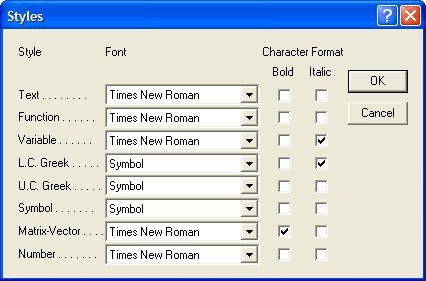
Figure 1. The Styles dialog box in the Equation Editor.
If this doesn't fix the printing problem, there is a good chance that something is messed up with your printer driver; either the driver is not installed fully or the driver is performing some inappropriate font substitutions. To test if this is the case, take the document to a different system, preferably one that uses a different printer. If the document prints correctly on that system, then you might try removing the printer driver and reinstalling it on your system.
If the problem persists, contact the good folks at Design Science. They are the creators of the Equation Editor, and they assure WordTips readers that they will be very responsive to any technical support issues such as this. Send your problem to support@dessci.com for the fastest response.
WordTips is your source for cost-effective Microsoft Word training. (Microsoft Word is the most popular word processing software in the world.) This tip (243) applies to Microsoft Word 97, 2000, 2002, and 2003.
Learning Made Easy! Quickly teach yourself how to format, publish, and share your content using Word 2021 or Microsoft 365. With Step by Step, you set the pace, building and practicing the skills you need, just when you need them! Check out Microsoft Word Step by Step today!
You can adjust where an equation is printed by moving it minute amounts in any direction.
Discover MoreThe Equation Editor is a great tool for working with mathematical formulas. If your formula includes a radical symbol, ...
Discover MoreThe Equation Editor is a tool you can use to create complex mathematical formulas and insert them in your documents. If ...
Discover MoreFREE SERVICE: Get tips like this every week in WordTips, a free productivity newsletter. Enter your address and click "Subscribe."
There are currently no comments for this tip. (Be the first to leave your comment—just use the simple form above!)
Got a version of Word that uses the menu interface (Word 97, Word 2000, Word 2002, or Word 2003)? This site is for you! If you use a later version of Word, visit our WordTips site focusing on the ribbon interface.
Visit the WordTips channel on YouTube

FREE SERVICE: Get tips like this every week in WordTips, a free productivity newsletter. Enter your address and click "Subscribe."
Copyright © 2026 Sharon Parq Associates, Inc.

Comments