
Please Note: This article is written for users of the following Microsoft Word versions: 97, 2000, 2002, and 2003. If you are using a later version (Word 2007 or later), this tip may not work for you. For a version of this tip written specifically for later versions of Word, click here: Limiting Spell Checking.
When you run the spell checker in Word (or when Word checks your spelling as you type), the words in your document are compared against both the main dictionary and any custom dictionaries you may have opened. (The main dictionary is the one provided by Microsoft; custom dictionaries are those you create by adding your own words.) Sometimes you may not want Word to do this.
For instance, let's say that you have developed a rather extensive dictionary that is very specific to your industry or to your company. The dictionary may contain many specialized terms, but using those terms to spell-check a document you are preparing for your church or civic organization may be inappropriate. If you want to limit Word's spell checker so it only uses the main dictionary—not your custom ones—you can follow these steps:
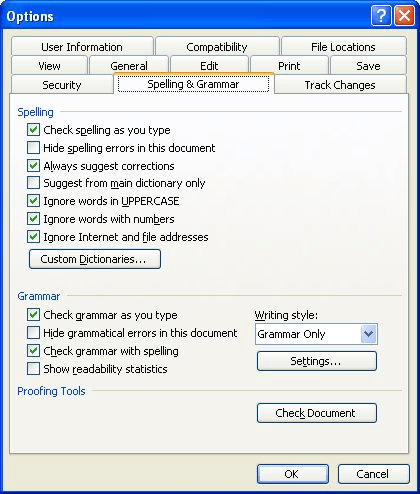
Figure 1. The Spelling & Grammar tab of the Options dialog box.
WordTips is your source for cost-effective Microsoft Word training. (Microsoft Word is the most popular word processing software in the world.) This tip (907) applies to Microsoft Word 97, 2000, 2002, and 2003. You can find a version of this tip for the ribbon interface of Word (Word 2007 and later) here: Limiting Spell Checking.
The First and Last Word on Word! Bestselling For Dummies author Dan Gookin puts his usual fun and friendly candor back to work to show you how to navigate Word 2019. Spend more time working and less time trying to figure it all out! Check out Word 2019 For Dummies today!
Grammar, particularly in English, has a perplexing array of rules and exceptions to those rules. Word does a fairly good ...
Discover MoreAutomatic Spell Checking can change your menu options.
Discover MoreIn my English classes in junior high, I would get marked down if I started sentences with a conjunction. ("There's a ...
Discover MoreFREE SERVICE: Get tips like this every week in WordTips, a free productivity newsletter. Enter your address and click "Subscribe."
There are currently no comments for this tip. (Be the first to leave your comment—just use the simple form above!)
Got a version of Word that uses the menu interface (Word 97, Word 2000, Word 2002, or Word 2003)? This site is for you! If you use a later version of Word, visit our WordTips site focusing on the ribbon interface.
Visit the WordTips channel on YouTube

FREE SERVICE: Get tips like this every week in WordTips, a free productivity newsletter. Enter your address and click "Subscribe."
Copyright © 2026 Sharon Parq Associates, Inc.
 Please Note:
This article is written for users of the following Microsoft Word versions: 97, 2000, 2002, and 2003. If you are using a later version (Word 2007 or later), this tip may not work for you. For a version of this tip written specifically for later versions of Word, click here:
Please Note:
This article is written for users of the following Microsoft Word versions: 97, 2000, 2002, and 2003. If you are using a later version (Word 2007 or later), this tip may not work for you. For a version of this tip written specifically for later versions of Word, click here: 
Comments