
Debbie asked if there was a way to change the background color of the screen whenever the Caps Lock key is on. She periodically hits the key without realizing it, and would like some sort of notification.
There is no way to tie the Caps Lock key to a background color that we've been able to locate. For most people this wouldn't really help that much, since looking at the screen to notice the background color would also allow the user to notice when typing was being done in ALL CAPS. Most people want some sort of audible notification of when the key has been activated. Some folks use some sort of third-party program like FirstCap, available free at http://www.falsinsoft.cjb.net.
You don't have to rely on a third-party program, however. You can use the accessibility features of Windows to audibly notify you when you've pressed the Caps Lock key. Follow these steps:
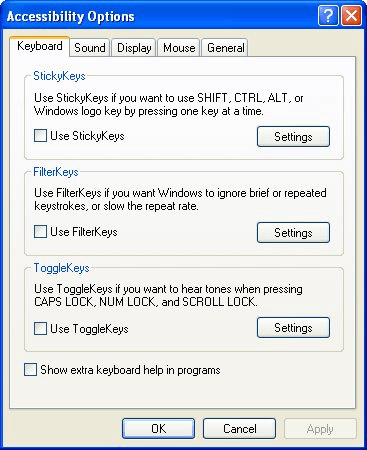
Figure 1. The Keyboard tab of the Accessibility Options dialog box.
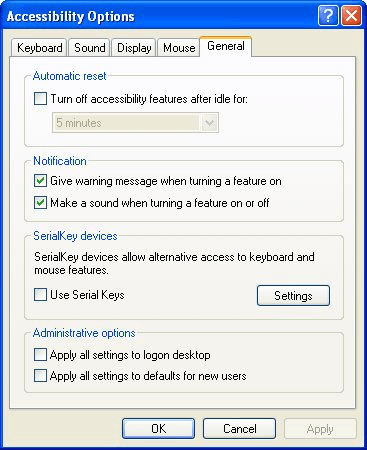
Figure 2. The General tab of the Accessibility Options dialog box.
The ToggleKeys feature, when turned on, will beep whenever the Caps Lock, Num Lock, or Scroll Lock keys are pressed.
WordTips is your source for cost-effective Microsoft Word training. (Microsoft Word is the most popular word processing software in the world.) This tip (336) applies to Microsoft Word 97, 2000, 2002, and 2003.
The First and Last Word on Word! Bestselling For Dummies author Dan Gookin puts his usual fun and friendly candor back to work to show you how to navigate Word 2019. Spend more time working and less time trying to figure it all out! Check out Word 2019 For Dummies today!
What are you to do if you find that you have no fonts available in Word, but they are available in other programs? There ...
Discover MoreWord allows you to specify distances using a number of different measurement units. Figuring out how those measurement ...
Discover MoreWord includes tons of internal commands that you can access as you customize your system. One of these is the Normalize ...
Discover MoreFREE SERVICE: Get tips like this every week in WordTips, a free productivity newsletter. Enter your address and click "Subscribe."
There are currently no comments for this tip. (Be the first to leave your comment—just use the simple form above!)
Got a version of Word that uses the menu interface (Word 97, Word 2000, Word 2002, or Word 2003)? This site is for you! If you use a later version of Word, visit our WordTips site focusing on the ribbon interface.
Visit the WordTips channel on YouTube

FREE SERVICE: Get tips like this every week in WordTips, a free productivity newsletter. Enter your address and click "Subscribe."
Copyright © 2026 Sharon Parq Associates, Inc.

Comments