
Shifting Margins Evident in Word 2002

Written by Allen Wyatt (last updated March 23, 2024)

Matt is experiencing a problem with documents created in Word 2000 and then viewed in Word 2002. He's noticing a shift in the top and bottom margins of the pages. When he opens a document that was created in Word 2000 on a Word 2002 system, the two margins are shifted upwards, even though the margin settings are the same.

This is caused by different ways in which the two versions of Word calculate the effect that line spacing has on the margins. The easiest way to make sure that the two versions handle margins the same is to follow these steps:
  1. Open the document in the Word 2000 system.
  2. Choose Options from the Tools menu. Word displays the Options dialog box.
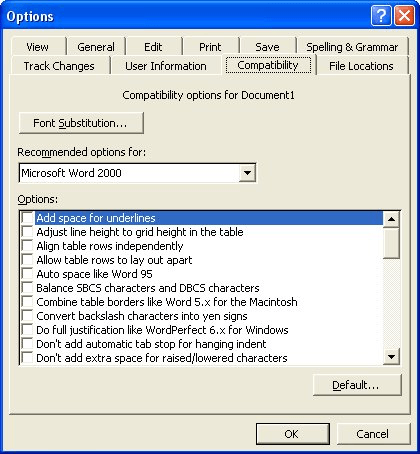
  3. Make sure the Compatibility tab is displayed. (See Figure 1.)
  4. Figure 1. The Compatibility tab of the Options dialog box.

  5. Note which compatibility options are selected. Pay particular attention to the settings entitled Suppress Extra Line Spacing at Bottom of Page and Suppress Extra Line Spacing at Top of Page.
  6. Close the Options dialog box.
  7. Open the document in the Word 2002 system.
  8. Choose Options from the Tools menu. Word displays the Options dialog box.
  9. Make sure the Compatibility tab is displayed.
  10. Make sure the compatibility options are set the same as they are on the Word 2000 system.
  11. Close the Options dialog box.

WordTips is your source for cost-effective Microsoft Word training. (Microsoft Word is the most popular word processing software in the world.) This tip (297) applies to Microsoft Word 2000, 2002, and 2003.
Author Bio

Allen Wyatt

With more than 50 non-fiction books and numerous magazine articles to his credit, Allen Wyatt is an internationally recognized author. He is president of Sharon Parq Associates, a computer and publishing services company. ...

MORE FROM ALLEN

Aborting a Macro and Retaining Control

If you need to exit a macro before it is finished running, you can do it using a brute force method, or you can build in ...

Discover More

Adjusting Table Row Height

When working with tables, you can adjust the height of individual rows. How you go about such adjustments depends on the ...

Discover More

Allowing for Words that Contain Numbers

When Excel does a spell-check of the information in a worksheet, you may want it to ignore words that contain numbers. ...

Discover More

Discover the Power of Microsoft Office This beginner-friendly guide reveals the expert tips and strategies you need to skyrocket your productivity and use Office 365 like a pro. Mastering software like Word, Excel, and PowerPoint is essential to be more efficient and advance your career. Simple lessons guide you through every step, providing the knowledge you need to get started. Check out Microsoft Office 365 For Beginners today!

More WordTips (menu)

Resetting a Function Key

Function keys are often used, in Word, for common operations. You can, if desired, change the way in which a function key ...

Discover More

Understanding the Normalize Text Command

Word includes tons of internal commands that you can access as you customize your system. One of these is the Normalize ...

Discover More

Changing How Word Presents Your Document

Tired of the old black-on-white text displayed by Word? Depending on your program version, you can configure Word to show ...

Discover More
Subscribe

FREE SERVICE: Get tips like this every week in WordTips, a free productivity newsletter. Enter your address and click "Subscribe."

View most recent newsletter.

Comments

If you would like to add an image to your comment (not an avatar, but an image to help in making the point of your comment), include the characters [{fig}] (all 7 characters, in the sequence shown) in your comment text. You’ll be prompted to upload your image when you submit the comment. Maximum image size is 6Mpixels. Images larger than 600px wide or 1000px tall will be reduced. Up to three images may be included in a comment. All images are subject to review. Commenting privileges may be curtailed if inappropriate images are posted.

What is four more than 7?

There are currently no comments for this tip. (Be the first to leave your comment—just use the simple form above!)


This Site

Got a version of Word that uses the menu interface (Word 97, Word 2000, Word 2002, or Word 2003)? This site is for you! If you use a later version of Word, visit our WordTips site focusing on the ribbon interface.

Videos
Subscribe

FREE SERVICE: Get tips like this every week in WordTips, a free productivity newsletter. Enter your address and click "Subscribe."

(Your e-mail address is not shared with anyone, ever.)

View the most recent newsletter.
