
Many people like to do their editing using the Context menus that appear when you right-click on an item. (In Word terminology, Context menus are also referred to as Shortcut menus.) If you find yourself changing the fonts of your text quite a bit, you can add your favorite typefaces to the Context menu that pops up when you right-click on text. This can save you a bit of mouse movement or a trip through the Font dialog box.
To add your fonts to the text Context menu, follow these steps:
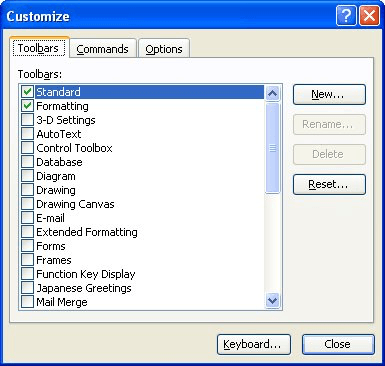
Figure 1. The Toolbars tab of the Customize dialog box.
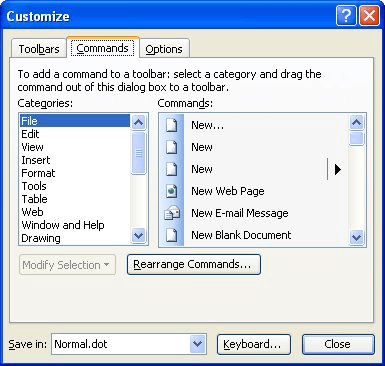
Figure 2. The Commands tab of the Customize dialog box.
WordTips is your source for cost-effective Microsoft Word training. (Microsoft Word is the most popular word processing software in the world.) This tip (1657) applies to Microsoft Word 97, 2000, 2002, and 2003.
Do More in Less Time! An easy-to-understand guide to the more advanced features available in the Microsoft 365 version of Word. Enhance the quality of your documents and boost productivity in any field with this in-depth resource. Complete your Word-related tasks more efficiently as you unlock lesser-known tools and learn to quickly access the features you need. Check out Microsoft 365 Word For Professionals For Dummies today!
Word, as you type, normally formats hyperlinks automatically. If you don't like the way that hyperlinks look in a ...
Discover MorePut a page break at the beginning of a shaded paragraph and you may be surprised at what you get on your printout. This ...
Discover MoreUsers of WordPerfect know what parallel columns are. There is no such capability in Word, but there are ways you can ...
Discover MoreFREE SERVICE: Get tips like this every week in WordTips, a free productivity newsletter. Enter your address and click "Subscribe."
Got a version of Word that uses the menu interface (Word 97, Word 2000, Word 2002, or Word 2003)? This site is for you! If you use a later version of Word, visit our WordTips site focusing on the ribbon interface.
Visit the WordTips channel on YouTube

FREE SERVICE: Get tips like this every week in WordTips, a free productivity newsletter. Enter your address and click "Subscribe."
Copyright © 2026 Sharon Parq Associates, Inc.

Comments