
Please Note: This article is written for users of the following Microsoft Word versions: 97, 2000, 2002, and 2003. If you are using a later version (Word 2007 or later), this tip may not work for you. For a version of this tip written specifically for later versions of Word, click here: Inserting the Document Creation Date.
Word keeps track of a good deal of information about your document, and then makes that information available to you. One of the pieces of information tracked is the document creation date. This is the date when the file was first created (opened as a new file) or the last time you chose Save As and saved the file under a new name. Word allows you to insert this date into your document by following these steps:
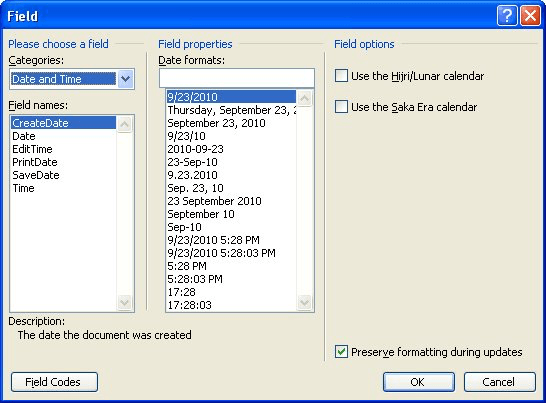
Figure 1. The Field dialog box.
This type of date field is a big help when you are using dates with memos, letters, and reports. The date stays the same as when you first created the file, unless (again) you save the file under a new name, which changes the file creation date.
WordTips is your source for cost-effective Microsoft Word training. (Microsoft Word is the most popular word processing software in the world.) This tip (962) applies to Microsoft Word 97, 2000, 2002, and 2003. You can find a version of this tip for the ribbon interface of Word (Word 2007 and later) here: Inserting the Document Creation Date.

Do More in Less Time! An easy-to-understand guide to the more advanced features available in the Microsoft 365 version of Word. Enhance the quality of your documents and boost productivity in any field with this in-depth resource. Complete your Word-related tasks more efficiently as you unlock lesser-known tools and learn to quickly access the features you need. Check out Microsoft 365 Word For Professionals For Dummies today!
Fields are meant to be dynamic, providing a result based on conditions at the time they are updated. You may want to ...
Discover MoreTemplates are a great way to create new documents because they act as intricate patterns to what those new documents ...
Discover MoreAre you developing a form with Word? In some instances it is advantageous to copy whatever is entered in a form field to ...
Discover MoreFREE SERVICE: Get tips like this every week in WordTips, a free productivity newsletter. Enter your address and click "Subscribe."
2023-03-13 10:00:25
Chris
Seems like this no longer works. I can create the field as described, but even when you create a copy, or download a new template... the date remains the same. nnIf you right click on the field and click 'update field' it will update to the correct date 'Create Date', but this isn't the sort of thing we expect users to do, so it's not really suitable for our purposes.nnThanks for posting though, I was glad to have something to experiment with!
2019-05-30 22:21:43
Harold Berman
G'day Allen,nnIs it possible to make a button for this operation "inserting the document creation date" and put it on the Quick Access Toolbar.nnI look forward everyday to receiving your daily nuggets for Excel and Word, as I am a volunteer tutor at an organisation that teaches Seniors to use computers and find some of the tips very helpful.nnKind regardsnnHarold BermannSydney Australia
Got a version of Word that uses the menu interface (Word 97, Word 2000, Word 2002, or Word 2003)? This site is for you! If you use a later version of Word, visit our WordTips site focusing on the ribbon interface.
Visit the WordTips channel on YouTube

FREE SERVICE: Get tips like this every week in WordTips, a free productivity newsletter. Enter your address and click "Subscribe."
Copyright © 2026 Sharon Parq Associates, Inc.
 Please Note:
This article is written for users of the following Microsoft Word versions: 97, 2000, 2002, and 2003. If you are using a later version (Word 2007 or later), this tip may not work for you. For a version of this tip written specifically for later versions of Word, click here:
Please Note:
This article is written for users of the following Microsoft Word versions: 97, 2000, 2002, and 2003. If you are using a later version (Word 2007 or later), this tip may not work for you. For a version of this tip written specifically for later versions of Word, click here: 
Comments