
Please Note: This article is written for users of the following Microsoft Word versions: 97, 2000, 2002, and 2003. If you are using a later version (Word 2007 or later), this tip may not work for you. For a version of this tip written specifically for later versions of Word, click here: Differences in Behavior of Links.
Fay has two documents linked to each other—a form linked to an information document. On her work PC when she hovers the mouse pointer over the link it shows as a "pointer hand." On her PC at home she doesn't get the hand, but can right-click and select to open the link. Fay is wondering why the behavior is different on the two systems and what she can do to fix her home PC.
The behavior difference that Fay notes is actually controlled by a configuration setting within Word. You need to display the Edit tab of the Options dialog box (click Tools | Options | Edit tab). (See Figure 1.)
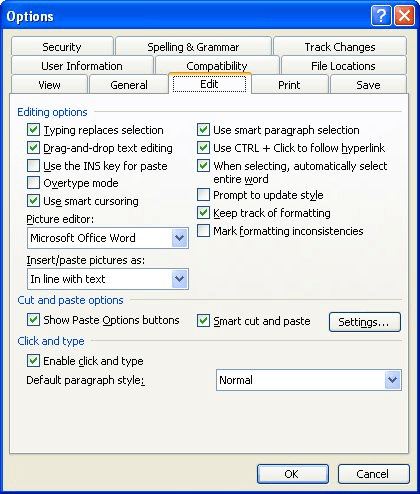
Figure 1. The Edit tab of the Options dialog box.
You want to pay attention to the setting named Use CTRL+Click to Follow Hyperlink. If this check box is selected then Word requires the use of the Ctrl key to activate the link. (Or, as Fay did, right-clicking the link and selecting to open it.) If the check box is unselected then you'll get the "pointer hand" and be able to simply click on a link to follow it.
WordTips is your source for cost-effective Microsoft Word training. (Microsoft Word is the most popular word processing software in the world.) This tip (3448) applies to Microsoft Word 97, 2000, 2002, and 2003. You can find a version of this tip for the ribbon interface of Word (Word 2007 and later) here: Differences in Behavior of Links.
Discover the Power of Microsoft Office This beginner-friendly guide reveals the expert tips and strategies you need to skyrocket your productivity and use Office 365 like a pro. Mastering software like Word, Excel, and PowerPoint is essential to be more efficient and advance your career. Simple lessons guide you through every step, providing the knowledge you need to get started. Check out Microsoft Office 365 For Beginners today!
Word allows you to embed active hyperlinks in your documents. If you later want to change or edit that hyperlink, you can ...
Discover MoreKeeping hyperlinks properly working in a group of documents can be a challenge. Here's a way that you can make sure that ...
Discover MoreHow to tell Windows which program to use for graphics with hyperlinks.
Discover MoreFREE SERVICE: Get tips like this every week in WordTips, a free productivity newsletter. Enter your address and click "Subscribe."
There are currently no comments for this tip. (Be the first to leave your comment—just use the simple form above!)
Got a version of Word that uses the menu interface (Word 97, Word 2000, Word 2002, or Word 2003)? This site is for you! If you use a later version of Word, visit our WordTips site focusing on the ribbon interface.
Visit the WordTips channel on YouTube

FREE SERVICE: Get tips like this every week in WordTips, a free productivity newsletter. Enter your address and click "Subscribe."
Copyright © 2026 Sharon Parq Associates, Inc.
 Please Note:
This article is written for users of the following Microsoft Word versions: 97, 2000, 2002, and 2003. If you are using a later version (Word 2007 or later), this tip may not work for you. For a version of this tip written specifically for later versions of Word, click here:
Please Note:
This article is written for users of the following Microsoft Word versions: 97, 2000, 2002, and 2003. If you are using a later version (Word 2007 or later), this tip may not work for you. For a version of this tip written specifically for later versions of Word, click here: 
Comments