
Please Note: This article is written for users of the following Microsoft Word versions: 2000, 2002, and 2003. If you are using a later version (Word 2007 or later), this tip may not work for you. For a version of this tip written specifically for later versions of Word, click here: Pop-up Windows in Word.
Word does not provide any intrinsic "pop-up" feature that results in a small window containing information when you click on a word or a link. The closest that can be found in Word is the ScreenTip feature, which displays a small ToolTip-like "hint" when you hover the mouse pointer over a hyperlink. (ScreenTips are not available in Word 97, having been introduced in Word 2000.) ScreenTips can be created as follows:
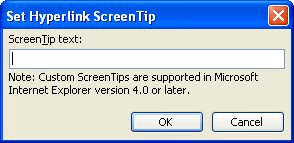
Figure 1. The Set Hyperlink ScreenTip dialog box.
Other than the ScreenTips, there is nothing else close to a "pop-up" feature in Word. One could be easily created, however, if you create a macro that displays information using the MsgBox function, and then you associate that macro with a MACROBUTTON field. When the user clicks on the button created by the field, the message in the macro is displayed in a dialog box.
WordTips is your source for cost-effective Microsoft Word training. (Microsoft Word is the most popular word processing software in the world.) This tip (1765) applies to Microsoft Word 2000, 2002, and 2003. You can find a version of this tip for the ribbon interface of Word (Word 2007 and later) here: Pop-up Windows in Word.

Do More in Less Time! An easy-to-understand guide to the more advanced features available in the Microsoft 365 version of Word. Enhance the quality of your documents and boost productivity in any field with this in-depth resource. Complete your Word-related tasks more efficiently as you unlock lesser-known tools and learn to quickly access the features you need. Check out Microsoft 365 Word For Professionals For Dummies today!
A possibility to try if you have a corrupt document.
Discover MoreTo keep up with the Discussion, you will need to refresh the comments to make sure you are in-the-know.
Discover MoreWhen you print address labels, you only have a limited amount of horizontal space for each line of the label. If your ...
Discover MoreFREE SERVICE: Get tips like this every week in WordTips, a free productivity newsletter. Enter your address and click "Subscribe."
There are currently no comments for this tip. (Be the first to leave your comment—just use the simple form above!)
Got a version of Word that uses the menu interface (Word 97, Word 2000, Word 2002, or Word 2003)? This site is for you! If you use a later version of Word, visit our WordTips site focusing on the ribbon interface.
Visit the WordTips channel on YouTube

FREE SERVICE: Get tips like this every week in WordTips, a free productivity newsletter. Enter your address and click "Subscribe."
Copyright © 2026 Sharon Parq Associates, Inc.
 Please Note:
This article is written for users of the following Microsoft Word versions: 2000, 2002, and 2003. If you are using a later version (Word 2007 or later), this tip may not work for you. For a version of this tip written specifically for later versions of Word, click here:
Please Note:
This article is written for users of the following Microsoft Word versions: 2000, 2002, and 2003. If you are using a later version (Word 2007 or later), this tip may not work for you. For a version of this tip written specifically for later versions of Word, click here: 
Comments