
There are several methods Word can use for line spacing. Typically, the default line spacing (as specified in the Line Spacing drop-down list of the Paragraph dialog box) is Single. (See Figure 1.) This means line spacing will be adjusted based on the largest font size or element on each individual line. Thus, if you have multiple font sizes on the same line of a paragraph, then the spacing for that line is dictated by the largest font size.
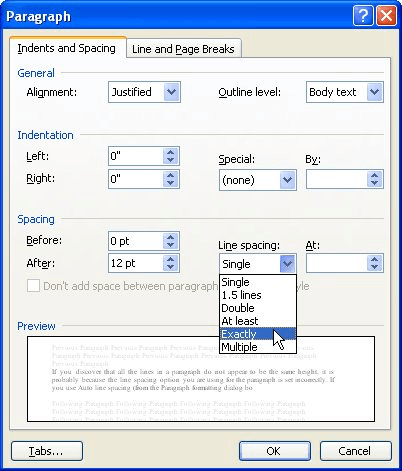
Figure 1. The Paragraph dialog box.
If your word processing needs are simple in nature, then Single line spacing is more than adequate. If you have more demanding word processing needs, then you may need to adjust the line spacing method used by Word to reflect the desired effect for your document. Display the Paragraph dialog box, then use the Line Spacing drop-down list to select a different spacing.
WordTips is your source for cost-effective Microsoft Word training. (Microsoft Word is the most popular word processing software in the world.) This tip (1719) applies to Microsoft Word 97, 2000, 2002, and 2003.
Learning Made Easy! Quickly teach yourself how to format, publish, and share your content using Word 2021 or Microsoft 365. With Step by Step, you set the pace, building and practicing the skills you need, just when you need them! Check out Microsoft Word Step by Step today!
Line spacing is used to control how close lines are to each other within a paragraph. Word allows you to specify several ...
Discover MoreWhen working with spacing between paragraphs, Word allows you to specify exactly how much space should be either before ...
Discover MoreThe formatting in a document is often a mix of styles and explicit formatting, applied over time. You may want to apply ...
Discover MoreFREE SERVICE: Get tips like this every week in WordTips, a free productivity newsletter. Enter your address and click "Subscribe."
There are currently no comments for this tip. (Be the first to leave your comment—just use the simple form above!)
Got a version of Word that uses the menu interface (Word 97, Word 2000, Word 2002, or Word 2003)? This site is for you! If you use a later version of Word, visit our WordTips site focusing on the ribbon interface.
Visit the WordTips channel on YouTube

FREE SERVICE: Get tips like this every week in WordTips, a free productivity newsletter. Enter your address and click "Subscribe."
Copyright © 2026 Sharon Parq Associates, Inc.

Comments