
Deborah had some problems with an AutoShape (a block arrow) placed behind the text of a table with rows of fixed width. When Deborah would try to nudge the arrow into position, the text would jump around, even after setting the Wrapping Style for the AutoShape to Behind Text.
The first thing to check, of course, is that the wrapping style didn't somehow get inadvertently changed. Select the block arrow, then choose Format | AutoShape | Layout | Behind Text. If this is the setting that was already made, then the next thing to check is where the AutoShape is anchored. Follow these steps:
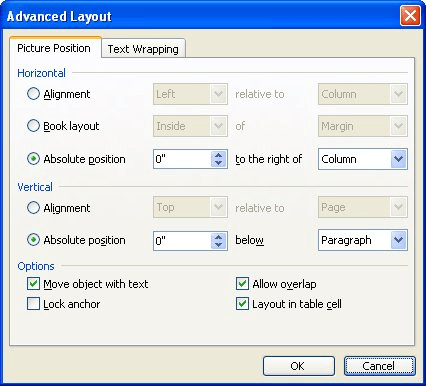
Figure 1. The Advanced Layout dialog box.
At this point you should still see the object anchor, but a little padlock appears next to it to indicate that it is locked. Now you should be able to adjust the positioning of the block arrow itself without your text jumping around.
WordTips is your source for cost-effective Microsoft Word training. (Microsoft Word is the most popular word processing software in the world.) This tip (1649) applies to Microsoft Word 97, 2000, 2002, and 2003.
Learning Made Easy! Quickly teach yourself how to format, publish, and share your content using Word 2021 or Microsoft 365. With Step by Step, you set the pace, building and practicing the skills you need, just when you need them! Check out Microsoft Word Step by Step today!
Insert a graphic into a document and Word allows you to add a shadow behind the graphic. You can also adjust the ...
Discover MoreWord documents can contain more than just text. You can even create documents that contain almost no text at all. This ...
Discover MoreWord allows you to insert graphics in two ways: either inline or floating. If you use inline graphics, you may want to ...
Discover MoreFREE SERVICE: Get tips like this every week in WordTips, a free productivity newsletter. Enter your address and click "Subscribe."
There are currently no comments for this tip. (Be the first to leave your comment—just use the simple form above!)
Got a version of Word that uses the menu interface (Word 97, Word 2000, Word 2002, or Word 2003)? This site is for you! If you use a later version of Word, visit our WordTips site focusing on the ribbon interface.
Visit the WordTips channel on YouTube

FREE SERVICE: Get tips like this every week in WordTips, a free productivity newsletter. Enter your address and click "Subscribe."
Copyright © 2026 Sharon Parq Associates, Inc.

Comments