
Word allows you to create all sorts of forms, and even provides form fields that you can add to your documents. Exactly how you add form fields has been covered in past issues of WordTips.
You may want to define a form field to contain a calculation. For instance, you might want a particular form field to contain the sum or the product of two other fields. Let's say you have two fields in your document; one of them is named Principal and the other is named Interest. If you wanted to create another field that shows the result of the two fields when multiplied by each other, you can follow these steps:
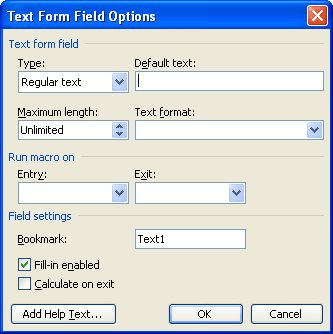
Figure 1. The Text Form Field Options dialog box.
=Principal * Interest
Now, whenever the form fields are updated, the Result field will contain the result of your principal multiplied by your interest.
WordTips is your source for cost-effective Microsoft Word training. (Microsoft Word is the most popular word processing software in the world.) This tip (1455) applies to Microsoft Word 97, 2000, 2002, and 2003.

Do More in Less Time! An easy-to-understand guide to the more advanced features available in the Microsoft 365 version of Word. Enhance the quality of your documents and boost productivity in any field with this in-depth resource. Complete your Word-related tasks more efficiently as you unlock lesser-known tools and learn to quickly access the features you need. Check out Microsoft 365 Word For Professionals For Dummies today!
Did you know that Word tries to keep track of who the author of a document is? This information can be easily added to ...
Discover MoreFields allow you to add simple dynamic content to your document. Here's how you can find the fields when you need to know ...
Discover MoreWord allows you to specify where it should start looking for your documents. This setting can come in handy if you store ...
Discover MoreFREE SERVICE: Get tips like this every week in WordTips, a free productivity newsletter. Enter your address and click "Subscribe."
2017-02-14 05:55:07
Naeemah
How can I apply this to calculate number of days form Date field?
for example each field got a date
the calculation field to count the days.
Got a version of Word that uses the menu interface (Word 97, Word 2000, Word 2002, or Word 2003)? This site is for you! If you use a later version of Word, visit our WordTips site focusing on the ribbon interface.
Visit the WordTips channel on YouTube

FREE SERVICE: Get tips like this every week in WordTips, a free productivity newsletter. Enter your address and click "Subscribe."
Copyright © 2026 Sharon Parq Associates, Inc.

Comments